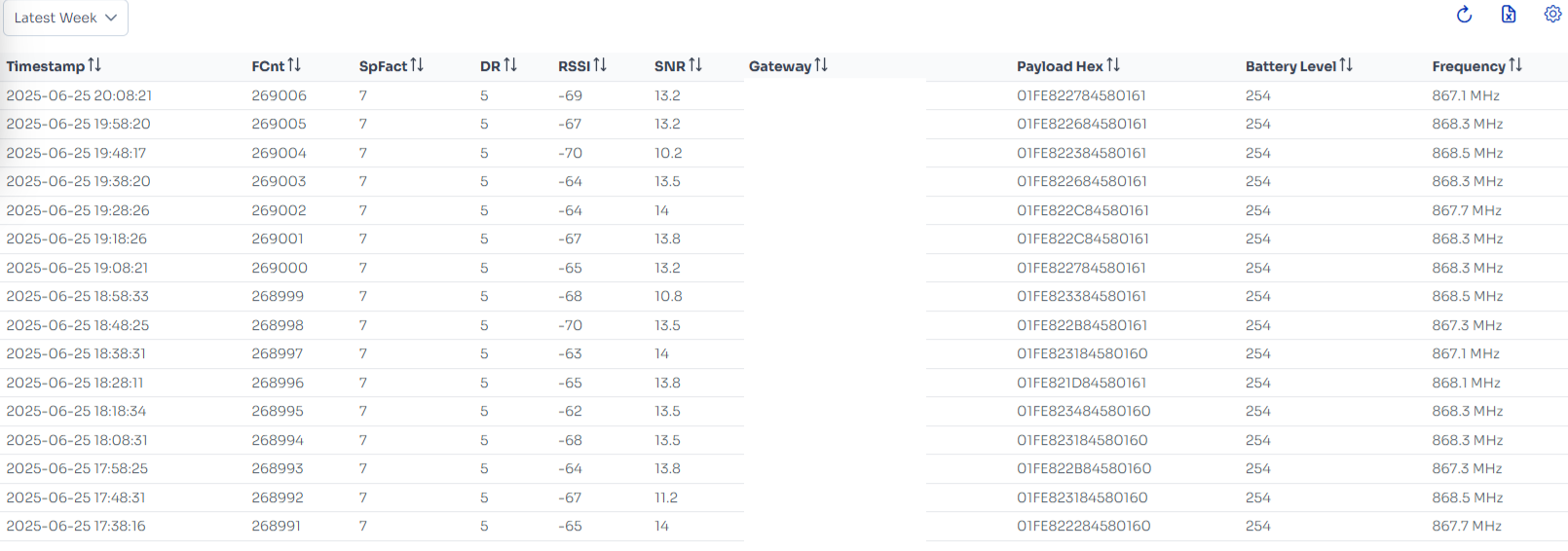
This page displays a LoRaWAN Data History Table, providing a detailed log of recent uplink transmissions from a LoRa device.
Here’s an explanation of the key elements:
Top Section:
Interval Dropdown ("Latest Week"): Lets users filter uplink records by time range — e.g., Latest 5 minute, Latest Hours, Latest Week, etc.
Top-Right Icons (from left to right):
 Refresh: Reloads the uplink data table with the most recent records.
 .png) Export: Exports the current data view into a downloadable format Excel.
Export: Exports the current data view into a downloadable format Excel..png) Settings: Opens options to customize visible columns
Settings: Opens options to customize visible columns
Table Columns:
Timestamp: The exact time each uplink was received.
FCnt (Frame Counter): Incremental counter of uplinks from the device, used to detect loss or duplication.
SpFact (Spreading Factor): Affects signal range and data rate; higher values = longer range, lower data rate.
DR (Data Rate): Indicates the LoRaWAN data rate setting.
RSSI (Received Signal Strength Indicator): Signal strength in dBm; higher (closer to 0) is better.
SNR (Signal-to-Noise Ratio): Quality of signal over noise; positive values are preferred.
Gateway: The ID of the gateway that received the uplink (not shown here, possibly hidden).
Payload Hex: Raw data payload in hexadecimal format.
Battery Level: Reported battery status (in this case, consistently 254).
Frequency: Frequency (in MHz) used during transmission — LoRaWAN channels in the EU868 band.