This page is part of the LoRaWAN Device Profiles section in the Customer portal. It allows the user to manage device profiles across multiple network servers, but is only shown if the customer is associated with more than one Network Server ID.
Table View Explanation
This table lists all LoRaWAN Device Profiles for this customer.
For detailed field-level definitions, including API field mappings and descriptions, please refer to the Device Glossary
Action Button
This row of icons on top right of the table represents action buttons typically found on a table interface in this case, for managing LoRaWAN Device Profiles. Here's what each icon does from left to right:
.png) Add: Opens a form to create a new LoRaWAN Device Profile.
Add: Opens a form to create a new LoRaWAN Device Profile.
.png) Edit: Allows you to modify an existing device profile’s parameters (such as Join Class, LoRaWAN Version, Channel Plan, etc.).
Edit: Allows you to modify an existing device profile’s parameters (such as Join Class, LoRaWAN Version, Channel Plan, etc.).
.png) Delete: Removes the selected LoRaWAN Device Profile.
Delete: Removes the selected LoRaWAN Device Profile.
 Refresh: Reloads the table to display the most up-to-date data.
.png) Export: Exports the list of device profiles (e.g., to CSV or Excel format) for backup, reporting, or analysis purposes.
Export: Exports the list of device profiles (e.g., to CSV or Excel format) for backup, reporting, or analysis purposes.
.png) Settings: Provides configuration options for the table display or column visibility. More explanation can be found here.
Settings: Provides configuration options for the table display or column visibility. More explanation can be found here.
Adding New Device Profile
The Device Profile defines LoRaWAN-specific settings that determine how a device communicates with the network server. Each parameter controls a different aspect of radio behavior, network interaction, or regional compliance.
.png)
For detailed field-level definitions, including API field mappings and descriptions, please refer to the Device Glossary
The following is what each parameter means:
Parameter | Description |
|---|---|
Name | The name of the device profile. Use a descriptive name that reflects the device type or use case. |
Network Server | Specifies which network server the device will connect to Options: |
Join Device Class | Configures the LoRaWAN class of the device. Options:
|
Channel Plan | Defines which LoRaWAN channel plan to use, based on your region or frequency plan. |
Regional Parameter Version | in the LoRaWAN MAC layer and Join Server behavior to indicate which version of the Regional Parameters (RP) a device is using or expecting. It's especially relevant for Join Server (JS) and Network Server (NS) interoperability during OTAA join procedures in LoRaWAN 1.1 and above. |
Send DeviceStatusReq Interval | When enabled, the network server periodically sends |
Maximum/Minimum Data Rate (DR) | Sets the allowable LoRaWAN data rate range for the device. This affects range and airtime. |
Dynamic RX1 Delay | Changes the RX1 receive window delay Options:
|
Max MAC Commands per Downlink | Limits how many MAC commands the network server can send in a single downlink frame. Options:
|
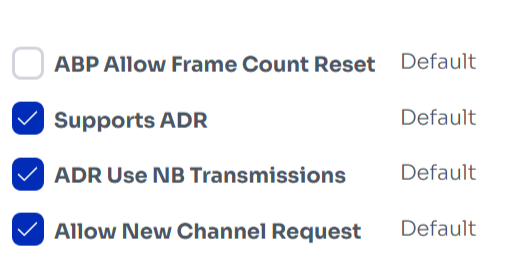
Name | Description |
|---|---|
ABP Allow Frame Counter Reset | When enabled, allows the Network Server to send a command to reset the frame counter of ABP (Activation By Personalization) devices. Useful for avoiding frame counter mismatch issues after a device reboot or reconfiguration. |
Support ADR | Enables or disables support for Adaptive Data Rate (ADR). ADR allows the network to optimize data rate, airtime, and energy consumption automatically based on signal conditions. |
ADR Use NB Transmission | |
Allow New Channel Request | Allows the Network Server to send |