When viewing a specific device on Netmore Connect, you are presented with a comprehensive interface that organizes all relevant information into tabs accessible through the Side Navigation pane on the left. This layout ensures quick access to detailed technical, operational, and historical data related to a device's identity, activity, and performance.
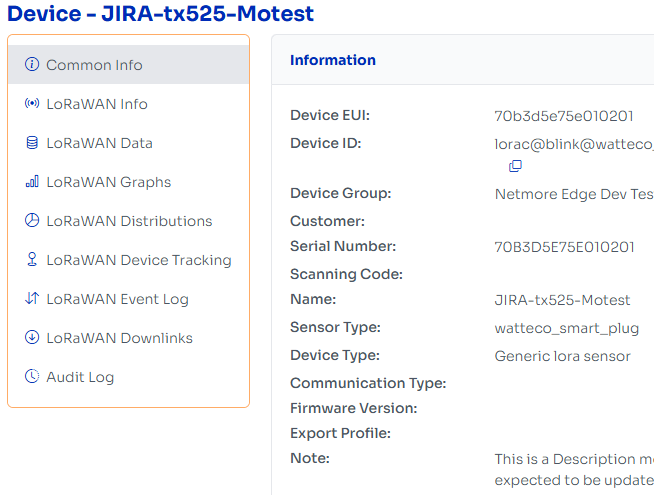
Side Navigation Description
Common Info – Displays general device metadata including identity, type, firmware, and location.
LoRaWAN Info – Shows LoRaWAN configuration such as keys, activation type, and join settings.
LoRaWAN Data – Lists uplink/downlink message logs with payload and timestamps.
LoRaWAN Graphs – Visualizes signal metrics like RSSI, SNR, and data rate over time.
LoRaWAN Distributions – Provides statistical breakdown of frequency, gateways, and spreading factors.
LoRaWAN Device Tracking – Displays GPS-based location or movement history.
LoRaWAN Event Log – Logs network events such as join requests and failures.
LoRaWAN Downlinks – Shows history and status of downlink messages sent to the device.
Audit Log – Tracks changes to device settings, including who made them and when.